Documentation
Everything you need to get started, integrate, and get the most out of Topogy.
Claude Code
Topogy receives Claude Code usage telemetry directly via OpenTelemetry. Once your developers add a small environment block to their Claude Code settings, every session streams usage data to Topogy in near real time — no agent to install and nothing to run on your side.
This is the companion to the Claude Enterprise integration: telemetry is per-event and immediate, while the Enterprise Analytics connection provides org-wide daily history. Most organizations run both.
Setting up
-
In Topogy, go to Settings → Integrations and choose Claude Code. Topogy creates the integration and generates an ingestion token for your organization.
-
The integration window shows a ready-to-paste settings snippet containing your token and telemetry endpoint:
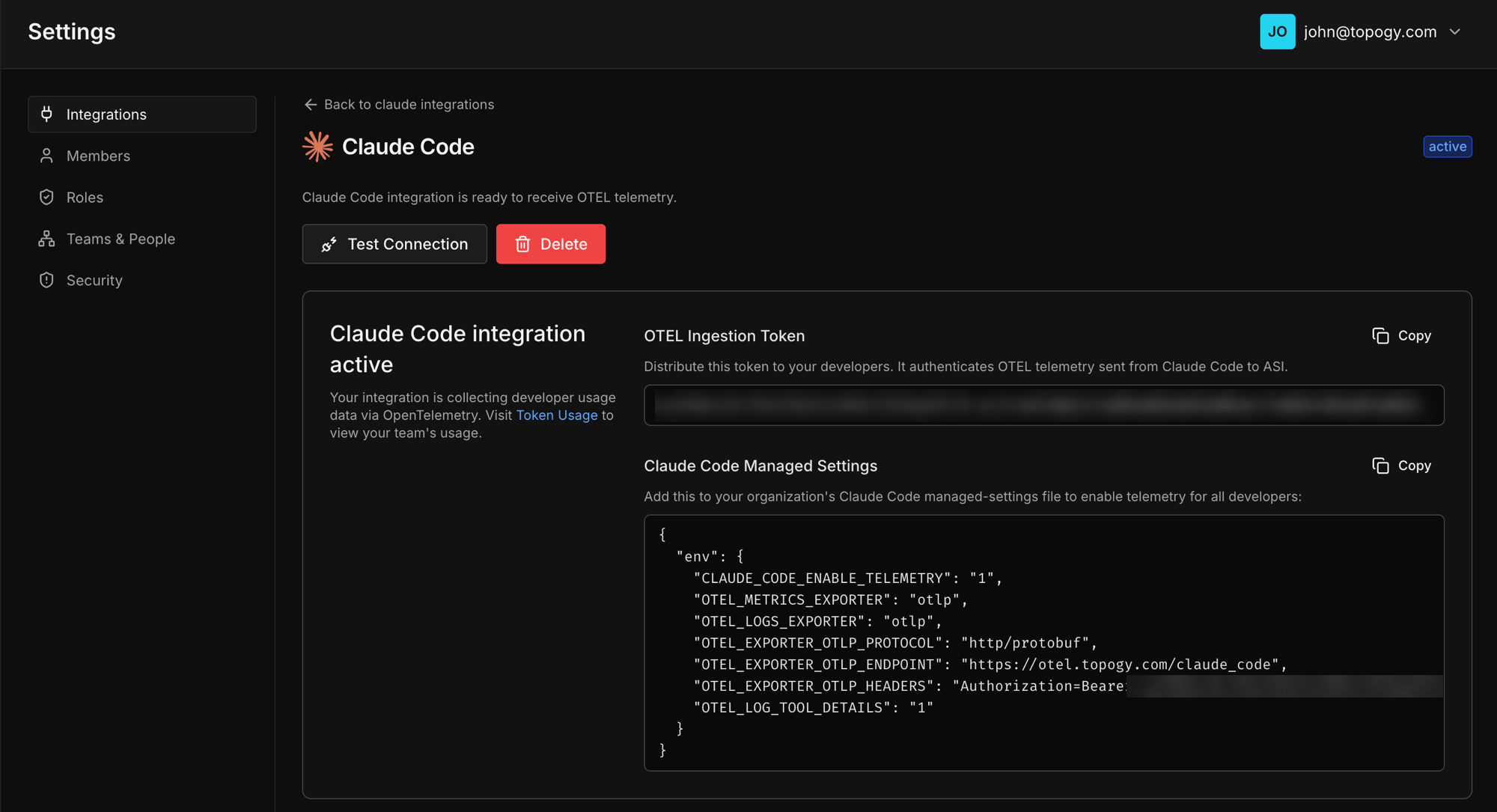
- Copy the snippet. It looks like this (use the one from your integration window — it contains your organization's token and endpoint):
{
  "env": {
    "CLAUDE_CODE_ENABLE_TELEMETRY": "1",
    "OTEL_METRICS_EXPORTER": "otlp",
    "OTEL_LOGS_EXPORTER": "otlp",
    "OTEL_EXPORTER_OTLP_PROTOCOL": "http/protobuf",
    "OTEL_EXPORTER_OTLP_ENDPOINT": "https://otel.topogy.com/claude_code",
    "OTEL_EXPORTER_OTLP_HEADERS": "Authorization=Bearer <your-ingestion-token>",
    "OTEL_LOG_TOOL_DETAILS": "1"
  }
}- Put the snippet where it reaches the developers you want to track (see below). Telemetry begins flowing the next time each of them starts a Claude Code session.
Treat the ingestion token like a password: it authorizes writing telemetry into your Topogy organization.
Choose who sends telemetry
The snippet is the same whichever way you deploy it. Where you put it decides whose sessions send telemetry to Topogy:
| Where | Who sends telemetry | Use it when |
|---|---|---|
| Each developer's own settings file | Each developer who adds it | You're starting with a few developers. |
| MDM | The machines your device management targets | You're rolling out to a team or pilot group. |
| Managed settings | Everyone in your Claude organization | Your whole organization is ready, and you're fine with every developer seeing an approval prompt. |
Each developer's settings file
Each developer merges the env block into their own ~/.claude/settings.json. If the file already has an env section, add the keys inside it. Only that developer's sessions are affected, and nobody sees an approval prompt.
MDM (a group of developers)
Push the same JSON as a managed settings file through your device management tool. Because you choose which machines get the file, MDM can turn telemetry on for one team or a pilot group before everyone else. See Claude Code's settings documentation for where the file goes on each platform.
If your organization has both server-managed settings in claude.ai and an MDM file, only the first source that sets anything applies, and server-managed settings are checked first. Put the telemetry settings in the one you already use. If you also deploy the Topogy Router, keep both in the same source.
Managed settings (whole organization)
Every developer will be prompted to approve these settings, or exit Claude Code. Managed settings in claude.ai apply to every Claude Code user in your Claude organization at once; there's no way to turn them on for only some people. Because the settings redirect where Claude Code sends telemetry, every developer sees a "Managed settings require approval" prompt and has to choose Yes, I trust these settings to keep using Claude Code. Anyone who chooses No, exit Claude Code can't use Claude Code until they approve. To roll out telemetry to only some developers, use MDM or have developers add it to their own settings file.
-
In claude.ai, go to Organization settings → Claude Code → Managed settings and choose Manage. You need the Owner or Primary Owner role.
-
Paste the snippet from your Topogy integration window. If managed settings already exist, merge the keys into your existing
envsection rather than adding a second one.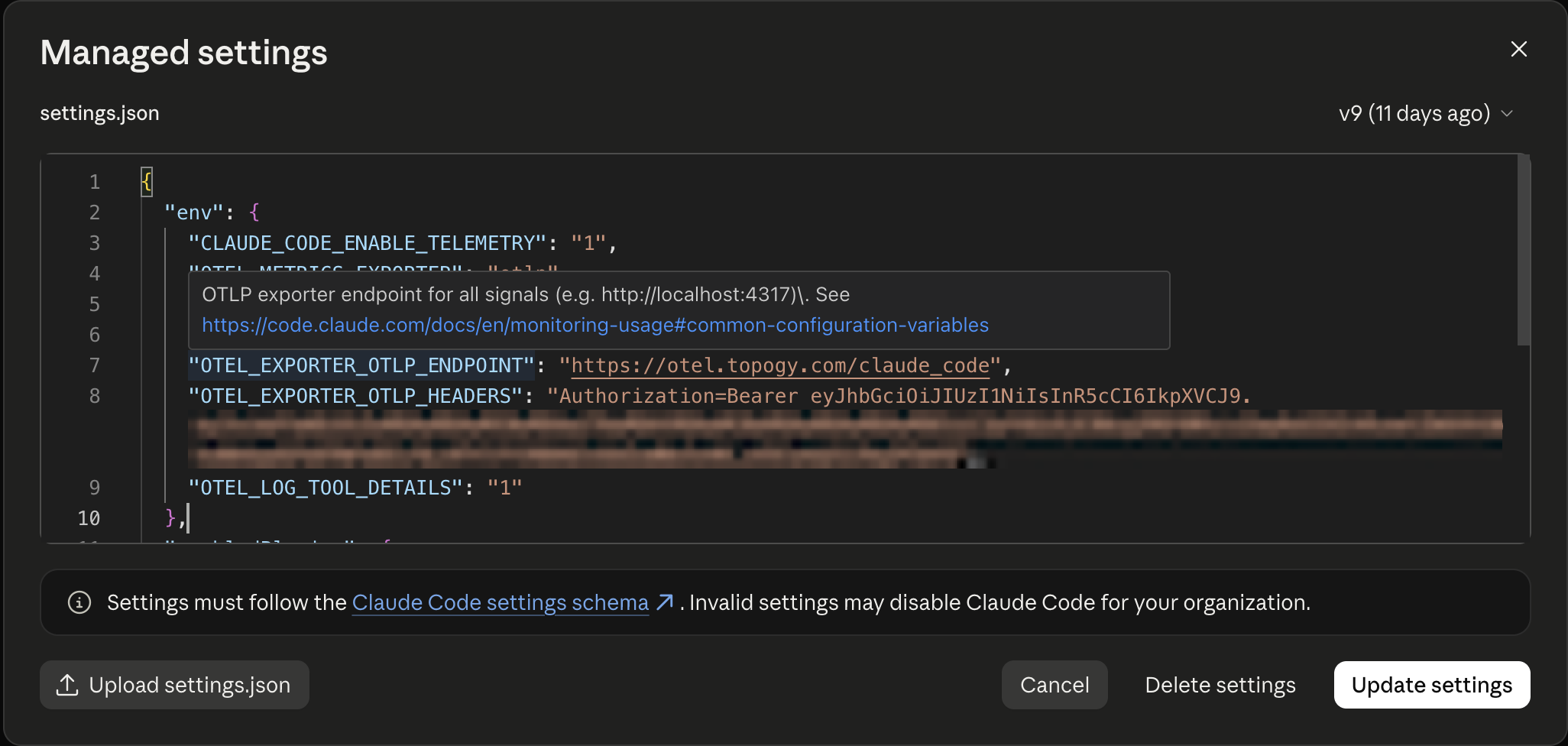
-
Choose Update settings.
-
The next time each developer starts Claude Code, they're asked to approve the settings. The prompt names Topogy's telemetry endpoint,
https://otel.topogy.com/claude_code, so let developers know to expect it and that it's your organization's collector.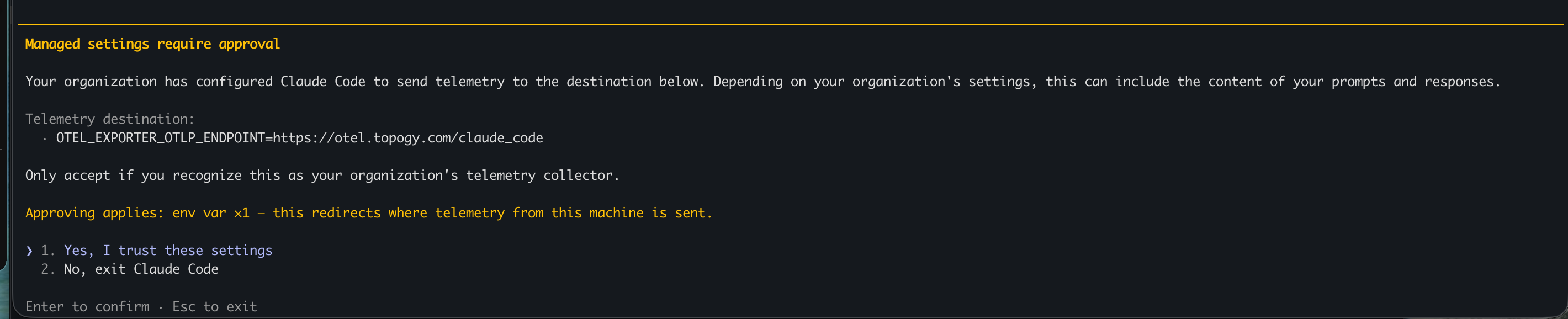
-
Managed settings need a Claude Team or Enterprise plan, and only reach people signed in with their Claude account, not a Console API key or a third-party provider such as Bedrock or Vertex.
See Anthropic's monitoring documentation for the full list of telemetry controls.
What data Topogy receives
Claude Code's telemetry is documented by Anthropic in Monitoring usage. With the configuration above, Topogy receives:
- Session activity — session identifiers, the model used, token counts, and cost estimates.
- Productivity events — lines of code changed, commits, and pull requests created through Claude Code.
- Tool events — which tools each session invoked: Bash commands, file edits, MCP servers and their tools, subagents, and skills. This is the richest part of the stream and powers the tool-level dashboards below.
What Topogy does with it
- Session extraction — raw events are rolled up into sessions: what was worked on, which branches and ticket references appeared, which files were edited.
- Analysis and correlation — sessions are linked to the pull requests they produced and grouped into features, so you can see AI-assisted work end to end: from the Claude Code session, to the PR, to the shipped change.
- Dashboards — org-wide token usage and cost, per-developer activity, and a Tool Usage view that breaks down which tools sessions invoke (Bash commands by verb, MCP servers, subagent types, skills).
Sensitive data: filtering and review
Tool telemetry can contain fragments of whatever your developers were working on, so Topogy scans every incoming payload for credential and PII patterns before anything is stored:
- Matches are replaced with a
<REDACTED:type>placeholder at ingestion — raw secrets never land in Topogy's database. - The built-in catalog covers 50 patterns across cloud credentials, VCS/CI tokens, AI provider keys, payment keys, communication and SaaS tokens, private keys, and PII (credit cards, SSNs, IBANs).
- On Topogy's Security page you can browse every detection (redacted context only — never the secret itself), and add your own custom patterns to filter anything specific to your organization.
This runs server-side as defense in depth, on top of whatever controls you set in Claude Code itself — Anthropic's monitoring documentation describes the client-side telemetry settings if you want to reduce what leaves your developers' machines in the first place.
For help during setup, reach out to your Topogy contact or email support@topogy.com.